Schema Markup for eCommerce to make your listings stand out
23 June 2025 Blog Posts
If you’ve never heard of Schema Markup, you’re not alone. But what might surprise you is that this small, and often overlooked tool, can be extremely powerful for your site. Including schema gives Google a better understanding of your products or content and can make your listings stand out in the search results.
What is Schema Markup?
Schema Markup is structured data added to your site that gives search engines extra context. It improves how your pages appear in search results and can make your product listings stand out with rich details like price, reviews, and availability.
The more space you take up in Google’s search results, the more attention and clicks you’re likely to get. Driving revenue through organic search comes down to having a product worth buying, a strategy that ranks and search results people actually want to click. Schema helps with that last part by making your listings more engaging at first glance, adding useful information to the Search Engine Results Page (SERP).
An introduction to ‘Product Snippets’
Product snippets are the visual results that appear on search engines as a result of schema. They’re not new, but they’re still an advantageous tool for any online retailer. In a recent article, Google emphasised that structured data on product pages is crucial for visibility in its new AI-powered search experiences.
There are two main types of schema you can use on eCommerce sites, and they do different things:
- Category Schema (PLP)
- Product Schema (PDP)
Category Schema shows broader pages like a collection or Product Listings Page (PLP) and doesn’t focus on just one listing, it can include:
- The overall price range of all products on that page
- General store reviews (not product-specific)
- Delivery and location for pickup information
See example below where Category Schema helps display price range across all swags, general delivery and return info, and the store’s overall star rating, but not specific stock or discount details.

Product schema is used on a Product Detail Page (PDP) and focuses on just one item, using the exact product page’s specific reviews, not company-wide and pulling in specific details like:
- The exact price and any discounts
- Whether the product is in stock
- Customer reviews for that product
- Delivery or return info
You can see this in action with an example from Linen House where Product Schema is used to show product price, star ratings and stock on Google.
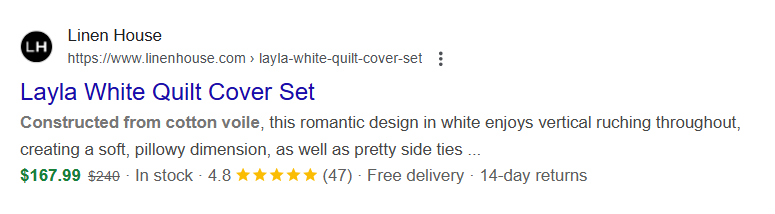
In short, Product Schema highlights exact details for a specific product, while Category Schema covers broader information about a collection or store page. By using both types on your site, you can help Google display the most helpful details in search, no matter where someone lands.
Schema markup in action
Here’s an example of a Megantic client that added schema during a non-sales period and saw a significant increase in clicks and impressions. After implementing schema markup and other SEO enhancements, apparel brand Hardtuned saw a noticeable uplift.
When comparing performance across the same 3-month period (April – June) in 2024 and 2025, we noticed:
- 124% YoY increase in clicks from non-branded keywords
- 297% YoY increase in search impressions
Now, we can’t attribute 100% of the growth to schema alone as it was part of a wider set of changes, but there was a noticeable shift in impressions and click-through rates once the new markup went live and there are countless other examples where product snippets have delivered measurable impact in a relatively short time.
Schema.org is the vocab you need to know
Product snippets are generated through schema markup, which is a code standard that search engines use to better understand your content. Think of it as the guidelines we stick to as international standards, they have a testing tool online which we used to check code and errors.
Schema.org vocabulary can be used with many different encodings, including RDFa, Microdata and JSON-LD.
Check out their start guides which include helpful clear examples and documentation. And if you are struggling to markup content, feel free to chat to our friendly technical team.
Product Snippet Troubleshooting & Reporting
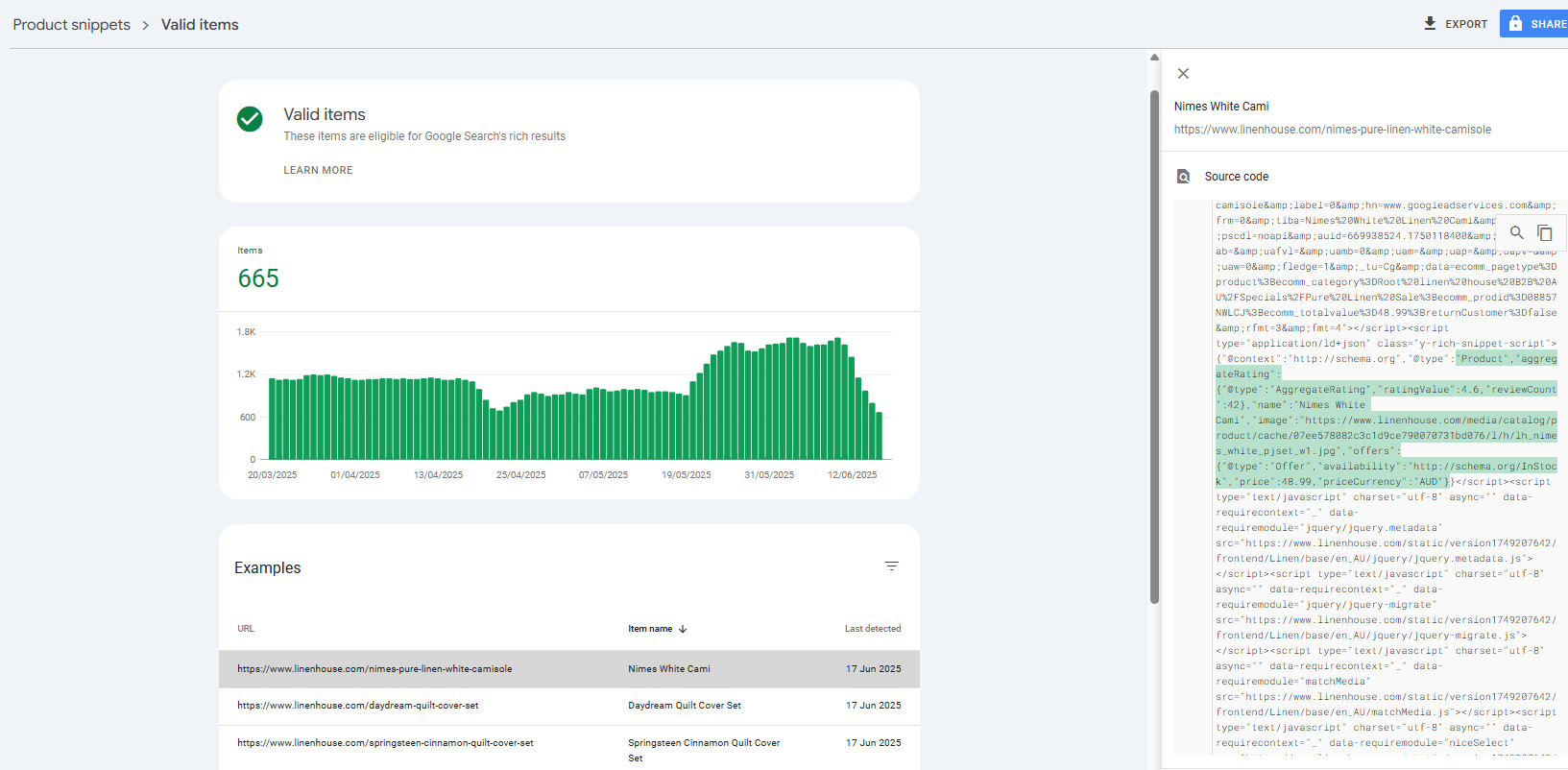
Google Search Console now provides a report to track your product snippets, you can see any errors, monitor fluctuations and verify them by selecting product snippets under the shopping menu.
Conclusion
Product snippets are essential for eCommerce! They help users compare, decide and buy directly from search results. If you’re not offering the same information as your competitors, you risk being ignored. Setup is simple with trusted product review apps, though review generation takes time and the increase in click-through rate makes it worthwhile. And as AI search continues to evolve rapidly, Google has made it clear that this tool is still a contributing factor to being seen.
Now that you understand the basics, spend some time playing around with schema.org code today and integrate these invisible changes to help Google better understand your content.